This is an example of a completed PIP review form: one real Done For You run for the AR1 review form, made in November 2026 for an example claimant called Linda, whose details are made up. For £99.99 you describe your conditions once and say what has changed since your last decision, and our system writes your answers activity by activity, in the order and with the question numbers of the AR1, ready for you to check and copy.
Linda already gets PIP. She has osteoarthritis in both knees and her right hip, which has got worse since March 2025, and COPD and type 2 diabetes, which are about the same. The screenshots below are the steps she went through and the answers that came back.
- Price
- £99.99, a one-off payment with no subscription. The same Done For You covers a new claim (PIP2) or an award review (AR1): you choose at the start.
- What you do
- Fill in one guided form in your own words, which takes about 10 to 15 minutes, and say whether things have stayed the same or got worse.
- What you get
- Answers for the 12 activities laid out by AR1 question number, with the box to tick for each question, then a second part that prepares you for an assessment if the DWP asks for one.
- Where it arrives
- On screen, as two PDF files you download and as a copy to your email.
- What it is not
- A guarantee. A review can raise, lower or stop an award. The DWP decides, and every answer is yours to check and change.
What the AR1 review form is
When your award is due to be looked at, the DWP sends a form called the "Personal Independence Payment Review form", known as the AR1. The current version is dated 11/25 (Version 3.0) and has 25 pages. GOV.UK replaced the older "Award Review: How your disability affects you" form with this one on 26 November 2024 and updated the example copy on its AR1 and AR2 examples page on 6 May 2026.
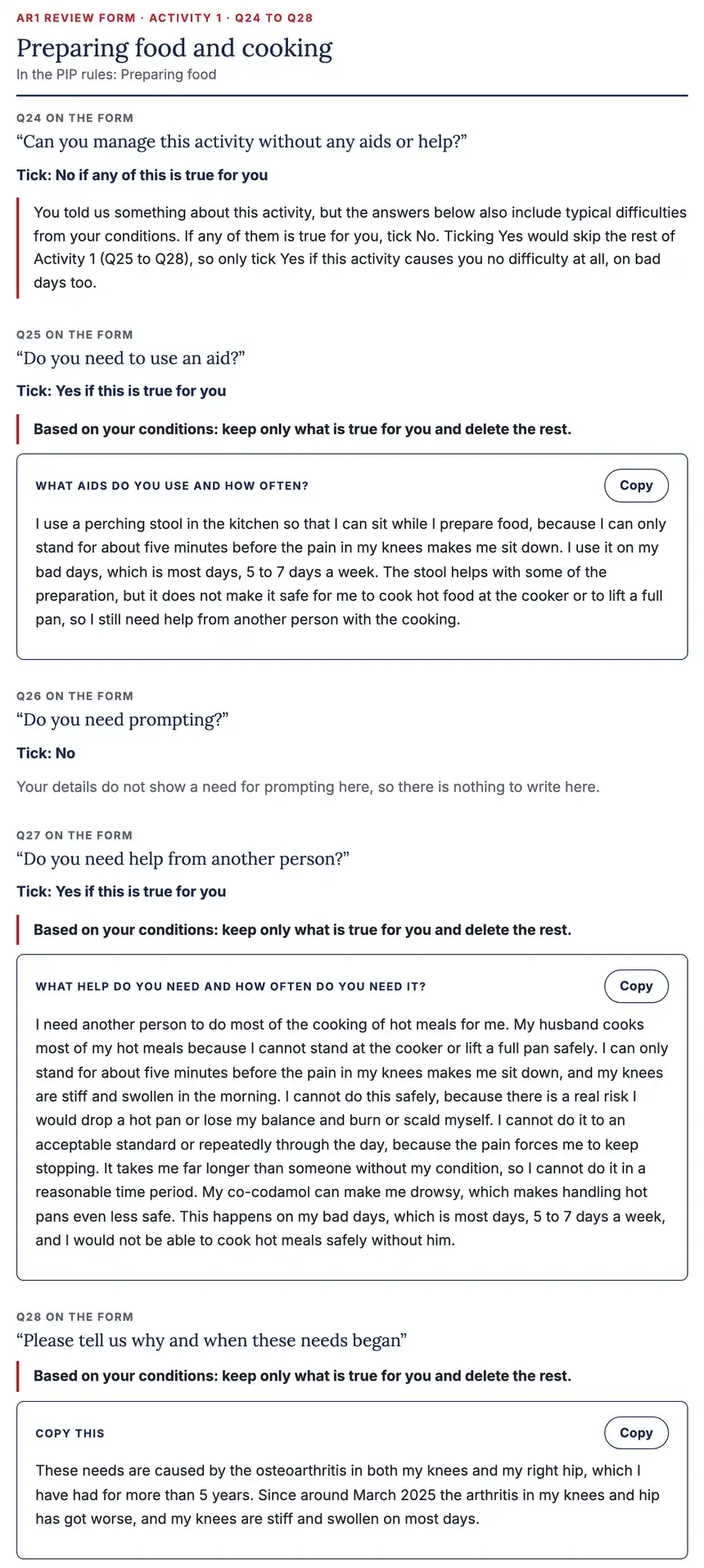
For each of the 12 activities the form asks the same short run of questions. Activity 1 is questions 24 to 28:
- "Can you manage this activity without any aids or help?" (most later activities ask "safely and without any difficulty"); a Yes takes you straight to the next activity;
- "Do you need to use an aid?", with what and how often;
- "Do you need prompting?", with what the other person does and how often;
- "Do you need help from another person?", with what help and how often;
- "Please tell us why and when these needs began".
There is no single "has anything changed" box. What has changed goes into each activity, mostly in the last question. Our guide to filling in the PIP review form goes through the whole form, including the parts the report does not write for you, such as your health professionals and medication list.
Step 1: choose the review form and say what changed
The Done For You form opens with "Which form are you filling in?". Linda picked "PIP award review", then "Things have got worse" and wrote what got worse and roughly when. The page asks for "only what has genuinely changed", because it goes into the "why and when these needs began" answers.
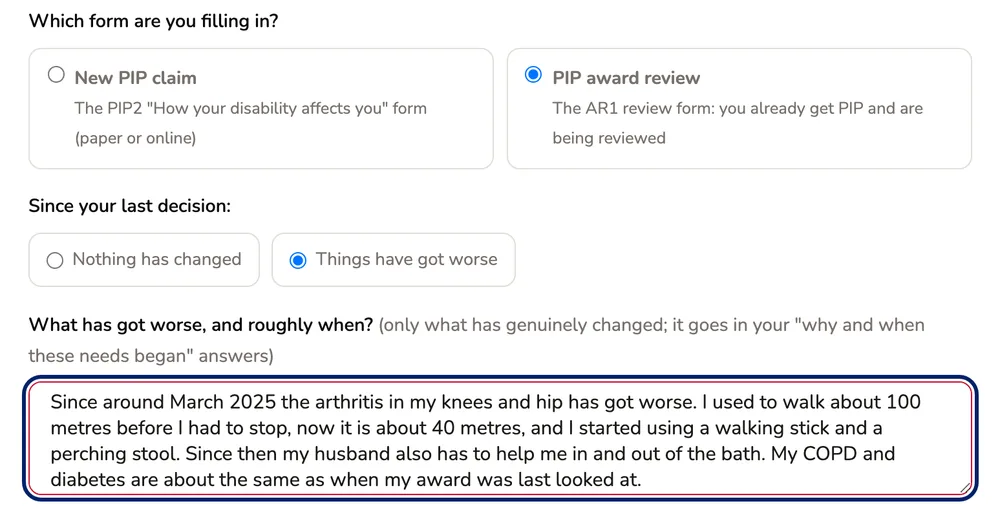
If nothing has changed, you pick "Nothing has changed" instead. That still matters on a review: the form asks about your needs now, and writing only "no change" leaves the DWP with little to go on. Our guide on why not to write "no change" explains why.
Step 2: the same questions as a new claim
The rest of the form is the one every Done For You buyer fills in: first name, every condition, how they affect daily life on most days and on bad days, how long you have had them, how they vary, how many days a week are bad days, who you live with, your medication and its side effects and any aids you use.
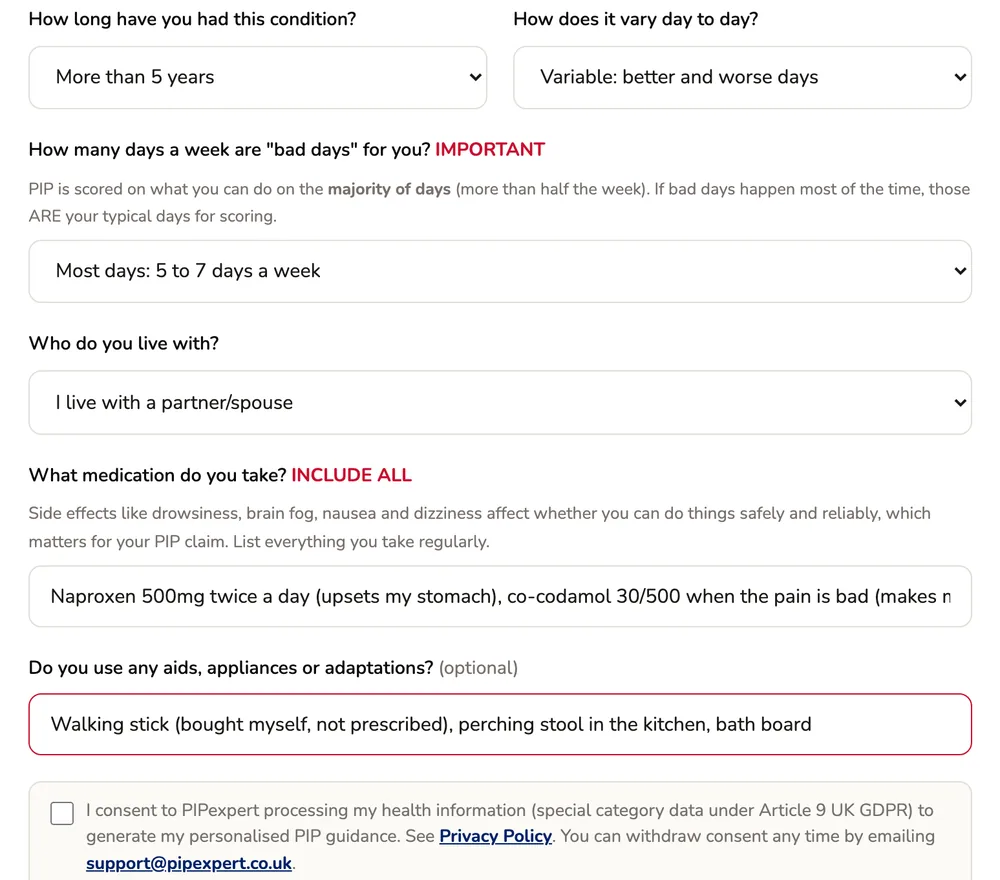
Linda also wrote what she has no problem with: eating, using the toilet, talking, reading letters, mixing with people, managing money and planning a journey. That matters, as you will see in Activity 5 below. Before generating, you tick a consent box for your health information to be used to write the report.
Step 3: the report is written
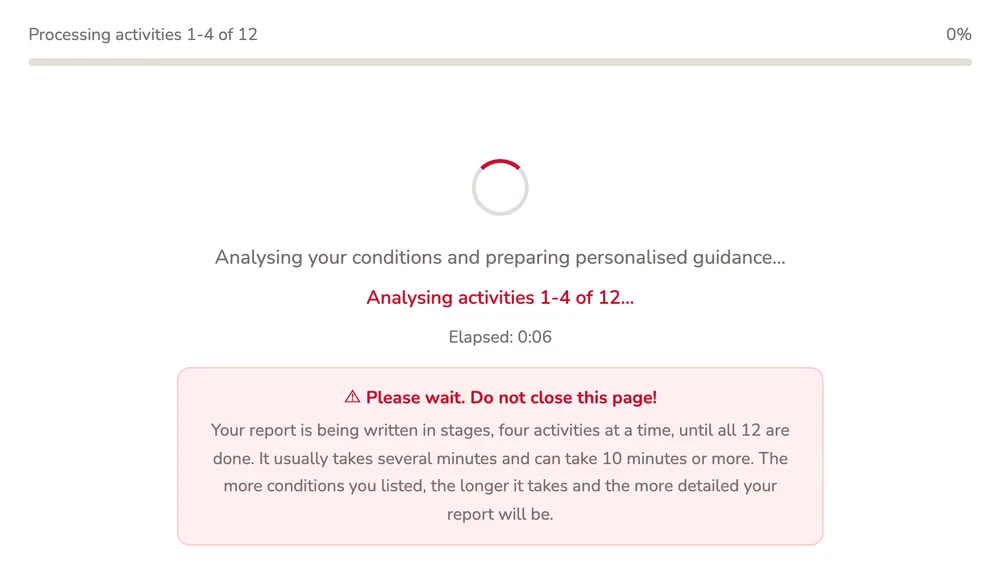
The report is written in stages, four activities at a time. The page says it usually takes several minutes and can take 10 minutes or more, and asks you to keep it open. Linda's report was on screen a little over a minute after she pressed Generate.
What arrives: an AR1 report in two parts
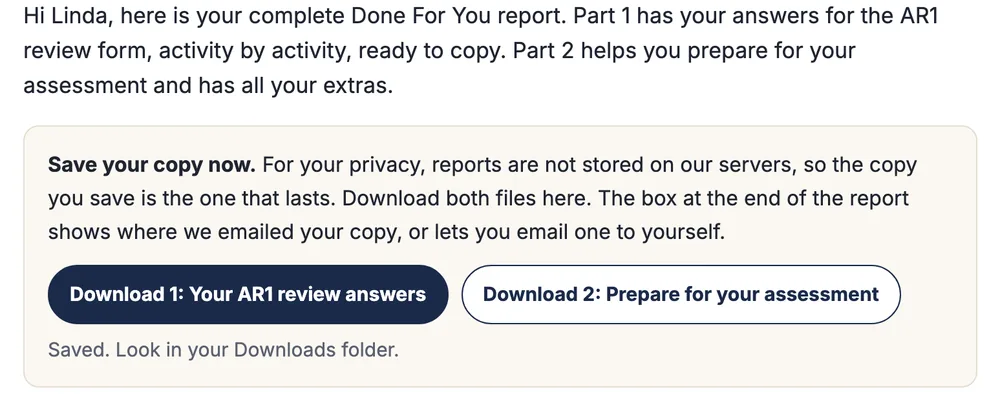
The report opens as "Linda's PIP report, in two parts". Part 1 is "Your AR1 review answers, activity by activity, ready to copy". Part 2 is "Prepare for your assessment", with the activities, questions, evidence and extras. Two buttons at the top download "Your AR1 review answers" and "Prepare for your assessment" as PDF files, and a copy of the report is emailed to you.
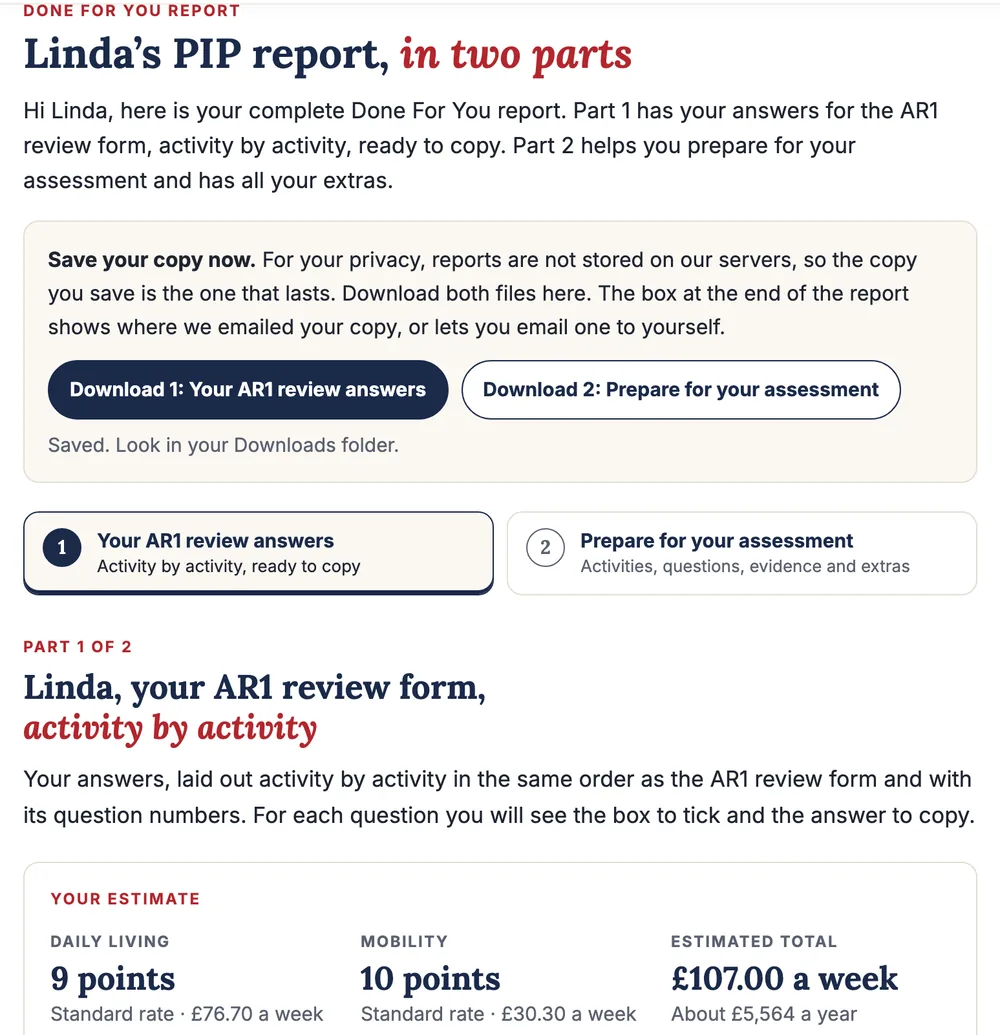
Save your copy straight away. PIPexpert does not keep reports or health details on its servers, and there are no accounts or logins, so the files and the email are the copies that last.
The estimate under the heading is only a suggestion from Linda's own description, and the box says so: "The DWP makes the final award decision." Linda's came to the standard rate for both parts. It is not a forecast of what the review will decide, and a review can end with a lower award than the one you have now. The 2026/27 weekly rates are on GOV.UK: £76.70 or £114.60 for daily living and £30.30 or £80.00 for mobility.
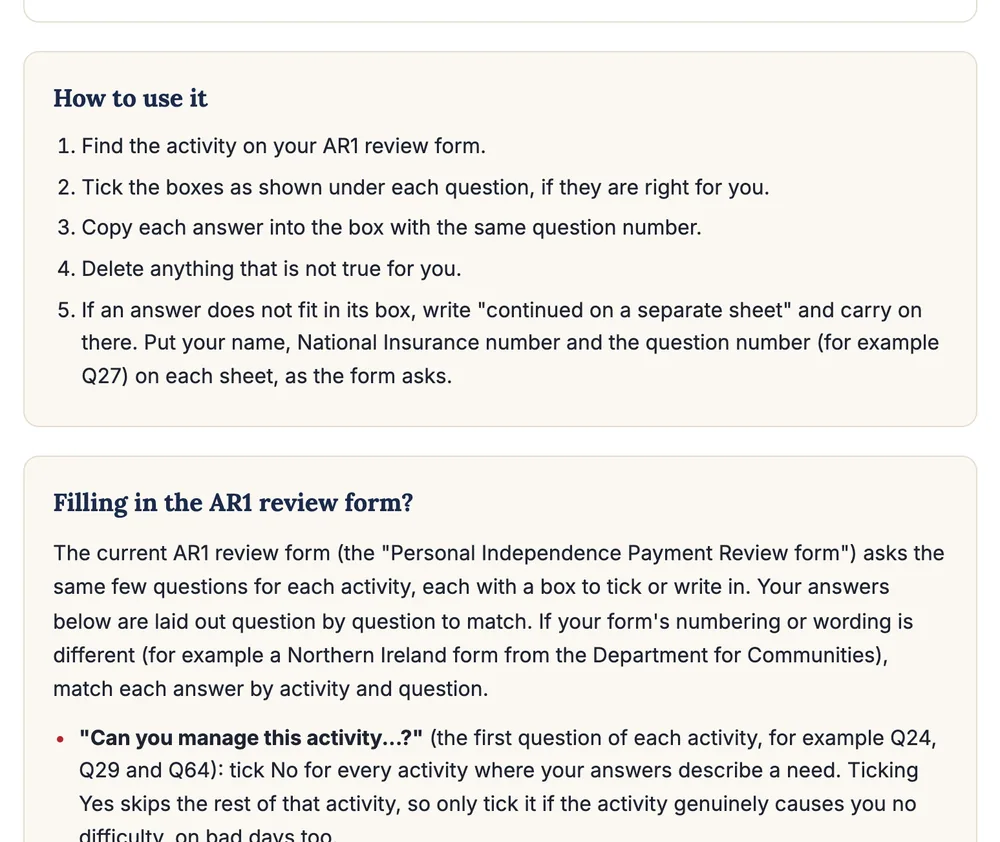
Under the estimate are five steps for using Part 1 and a short guide to the current AR1:
One activity in full: Activity 1, questions 24 to 28
Each activity has the AR1 heading, its question numbers and the name the PIP rules use for it. Under every question the report says which box to tick and gives the answer in the first person, with a Copy button. Here is Linda's preparing food and cooking:
Three things to notice:
- The tick comes first. Q24 says "Tick: No if any of this is true for you", with a warning that a Yes would skip the rest of the activity. On the AR1, a Yes to the first question means you write nothing for that activity.
- Questions with nothing to say stay empty. Q26 says "Tick: No" because Linda's details show no need for prompting with cooking.
- Suggestions are labelled. Where an answer adds typical difficulties from her conditions to what she wrote, the report says "Based on your conditions: keep only what is true for you and delete the rest." You sign a declaration on the AR1 that the information is correct and complete, so this step matters.
The answers also use the test the DWP scores against. Under regulation 4(2A) of the PIP Regulations 2013, you only count as able to do an activity if you can do it safely, to an acceptable standard, repeatedly and within a reasonable time period. That is why Linda's Q27 answer goes through those four tests one by one. The PIP descriptors guide lists what each activity scores.
Where the change shows: Activity 4, washing and bathing
Linda's change since her last decision appears in the activities it affects. In washing and bathing, Q42 describes the help she now needs to get in and out of the bath, and Q43 says why and when:
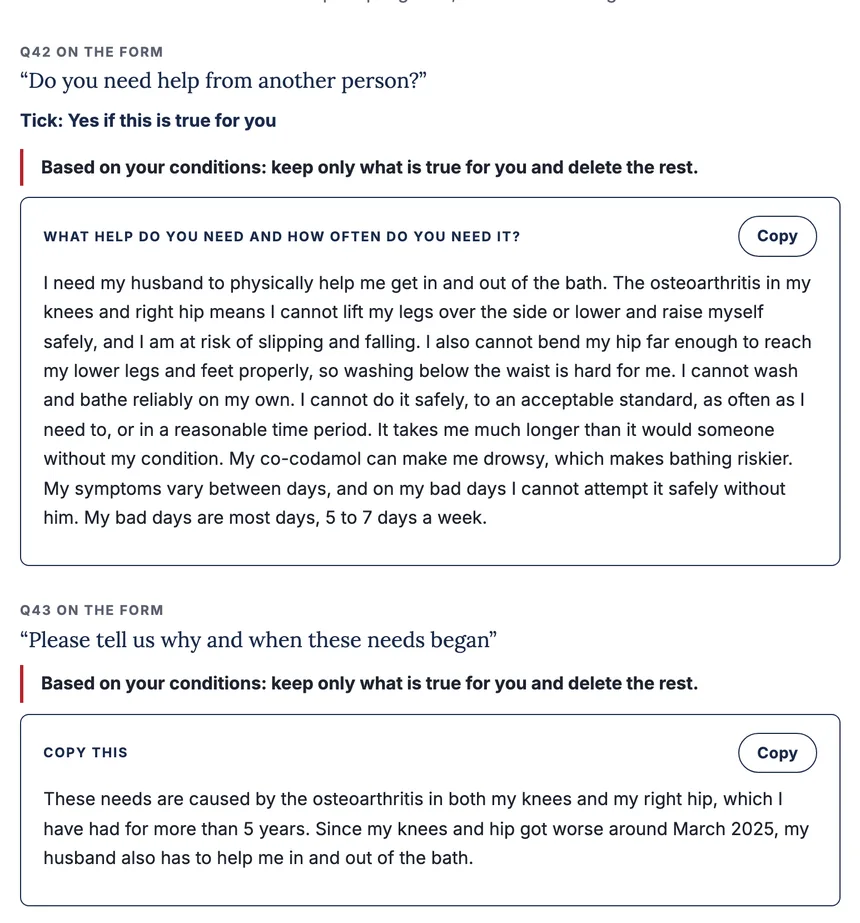
The date and the change come from what Linda typed in Step 1. When no date is given, the "why and when" answer leaves the date out rather than making one up.
When an activity is no problem: Activity 5
Linda said using the toilet is no problem for her, so the report does not invent a need. It tells her to tick Yes and move on:
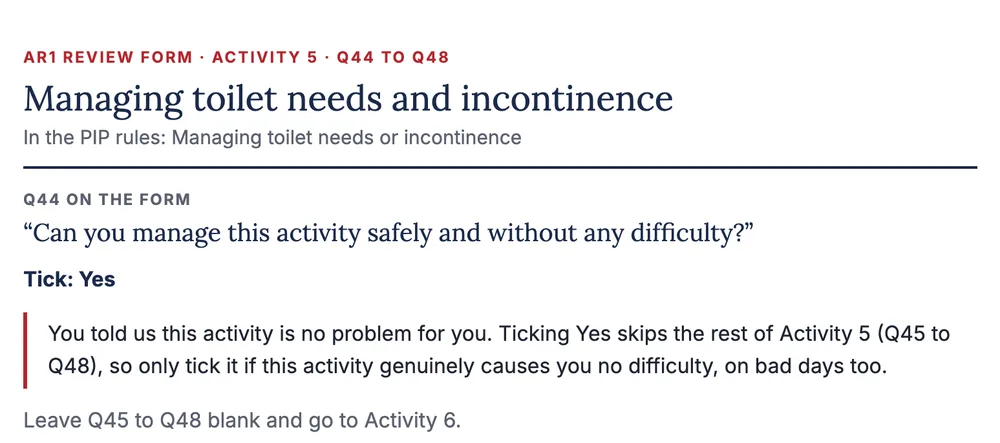
The same happened for eating and drinking and for the five activities from Activity 7 to Activity 11: each says "Tick: Yes" and which questions to leave blank.
A mid-form activity: Activity 6, dressing and undressing
Linda wrote that her husband helps her put on socks, tights and shoes because she cannot bend her hip far enough. Activity 6 turns that into the AR1 answers: no aid, no prompting, help from another person at Q52 and the reason at Q53.
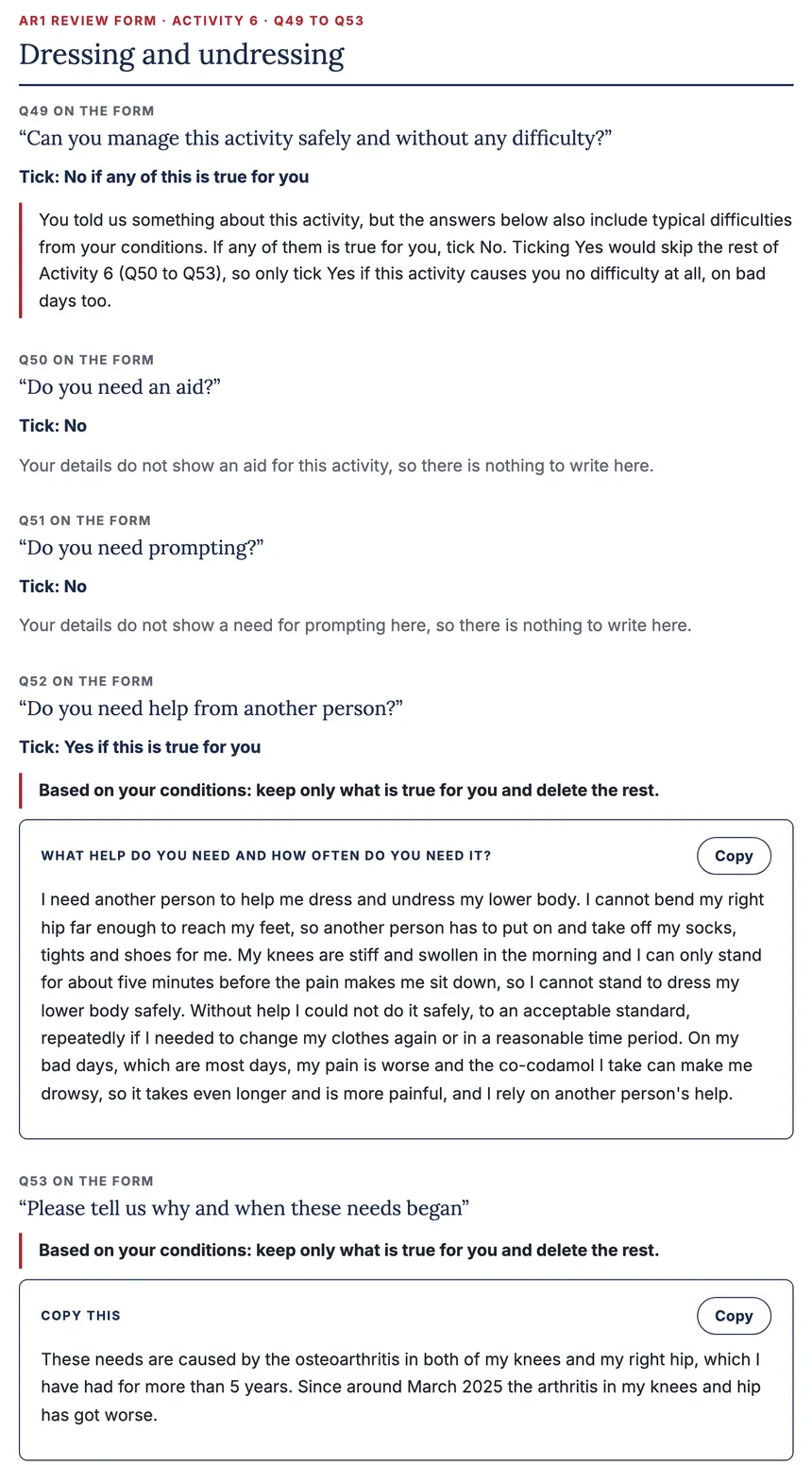
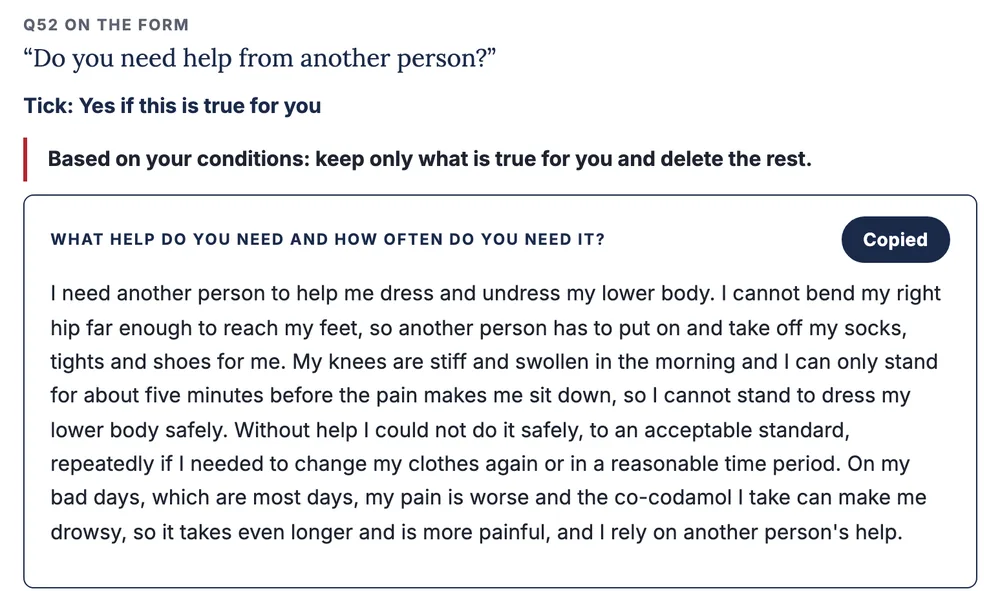
Each answer box has its own Copy button. Pressing it copies the text of that box only, and the button changes to "Copied", so you can paste it straight into the box with the same question number on a typed or printed form:
The walking questions: Activity 12, moving around
Activity 12 on the AR1 has questions of its own. Q78 asks how far you can walk on a regular and repeated basis and has distance boxes rather than a Yes or No. Linda now stops after about 40 metres, so the report says to tick "Between 20 and 50 metres" and to check that it is right for her on most days. Her walking stick was bought, not prescribed, and Q80 asks only about a prescribed aid, so the report says to tick No there and gives one line to copy into Q83 instead:
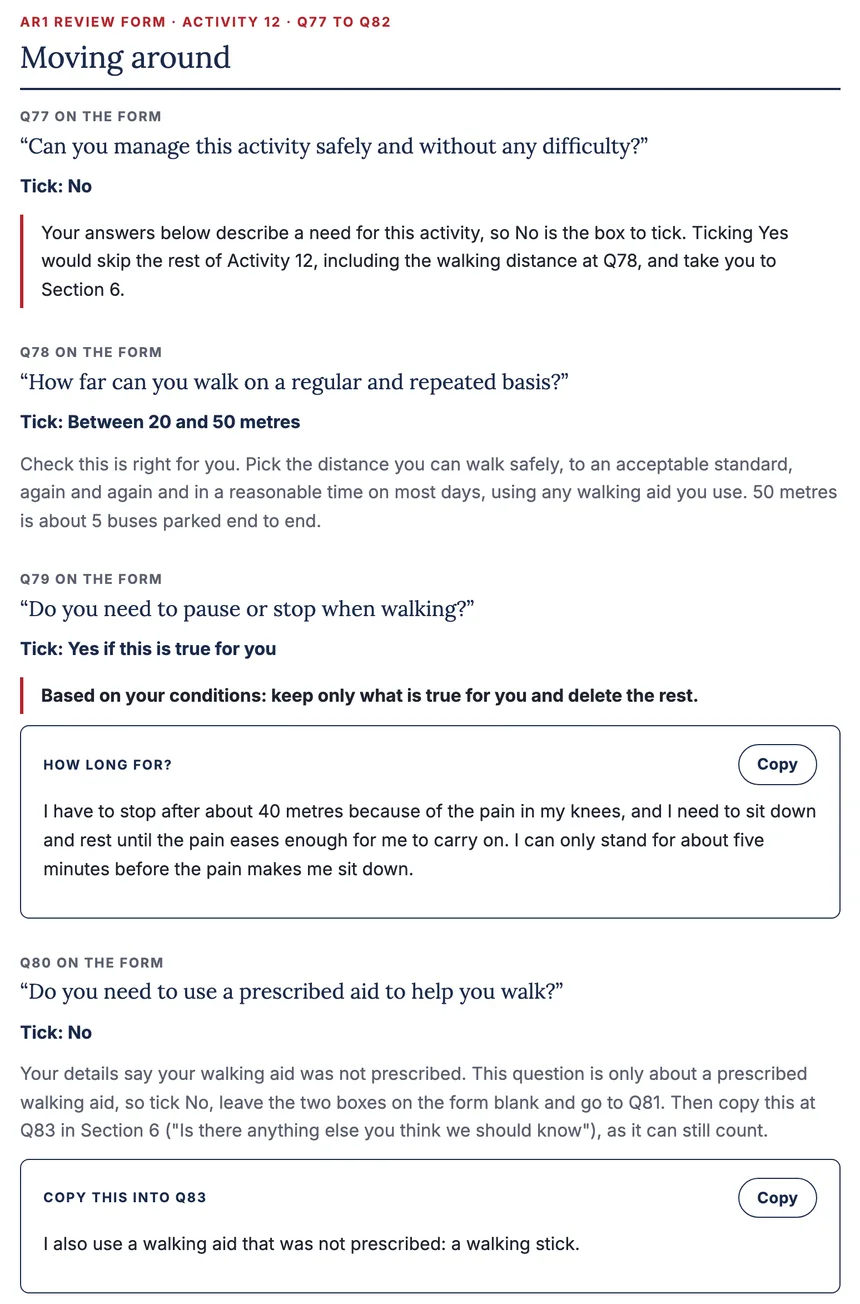
The last box, Q82, repeats the change she typed in Step 1: she used to walk about 100 metres before she had to stop and now it is about 40 metres.
Part 2: preparing for an assessment
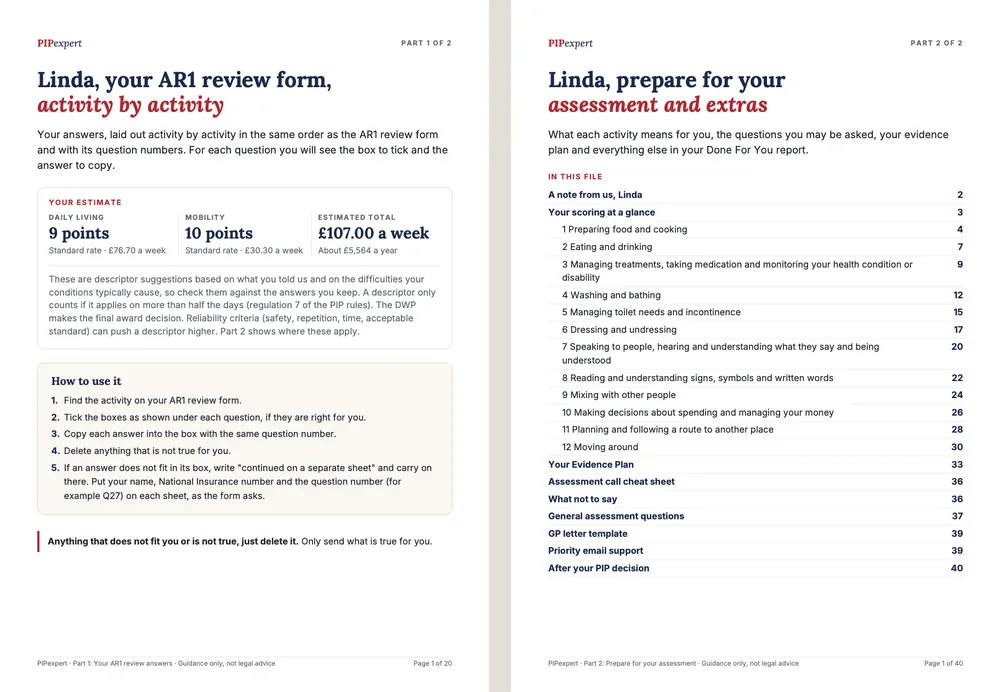
After you send the form back, the DWP may phone you or ask you to an assessment if it needs more information. The second tab at the top of the report opens Part 2, "Prepare for your assessment and extras". It starts with a contents list that shows the suggested points for each activity:
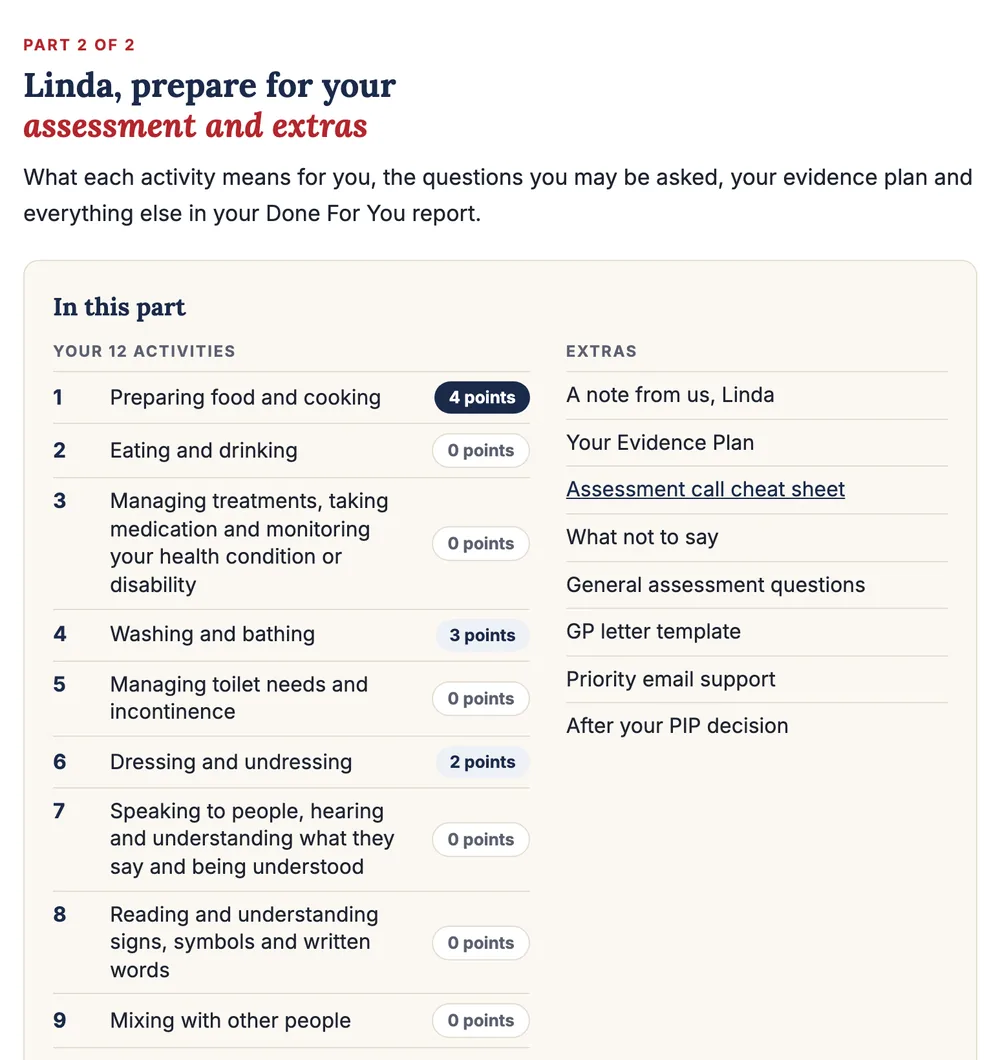
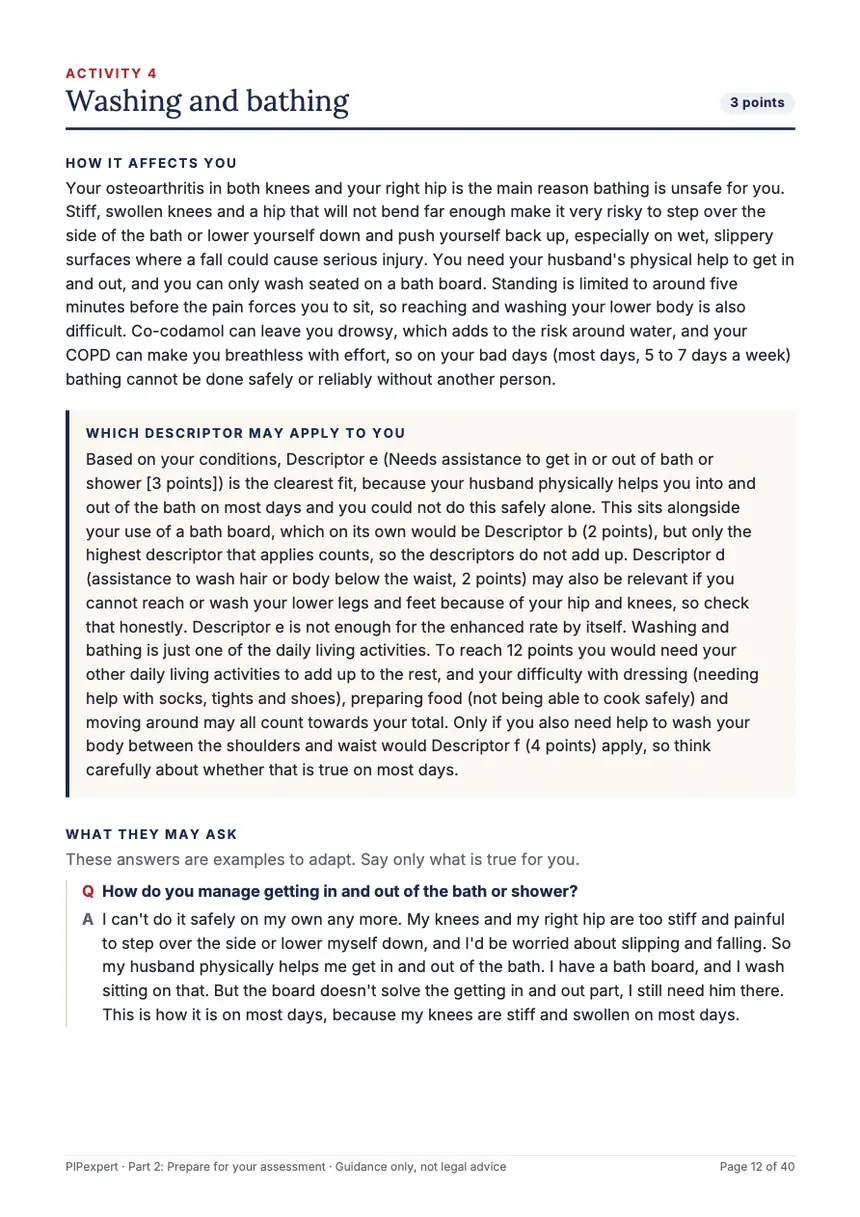
Each activity then has a card: how it affects you, which descriptor may apply and why, the questions an assessor may ask with example answers built from your details, questions to ask yourself and the evidence to gather. After the 12 cards come the evidence plan grouped by who to ask, a cheat sheet for the assessment call, a list of phrases to avoid, general assessment questions, a GP letter template and what happens after the decision. Here is Linda's washing and bathing card, as it appears in the second PDF:
Our guide to PIP review assessment tips covers the review assessment itself.
The two PDFs and the email copy
The two buttons at the top of the report save the two parts as PDF files. After Linda pressed them, the page said "Saved. Look in your Downloads folder.":
Linda's first PDF, "Your AR1 review answers", has 20 pages: the estimate, how to use it, the AR1 note and the 12 activities with the same ticks and answers as the screen. The second, "Prepare for your assessment", has 40 pages: the contents, a scoring summary, the 12 activity cards and the extras. Both have a contents page, so you can go straight to an activity.
The same two files are emailed to the address you used when you paid. A box at the end of the report says where they went, with a reminder to check the Spam or Junk folder if they have not arrived within 5 minutes. If the email could not be sent, the same box lets you send a copy to yourself.
How you copy it onto the AR1
- Sections 1 to 4 are yours. Your details, the declaration, your health professionals, your conditions with start dates and your medication list come from you. The report does not fill those in.
- Section 5, the 12 activities. For each activity, tick the boxes shown if they are right for you, copy each answer into the box with the same question number and delete anything that is not true.
- Use extra sheets. If an answer does not fit, carry on on a separate sheet with your name, National Insurance number and the question number, as the form asks.
- Send it back in time. GOV.UK says to return the form within 1 month and to contact the PIP enquiry line if you need more time. The front of the form gives the date and says your PIP may stop if the form is not back by then. If you are waiting for evidence, the form says to send what you have and the rest later.
The free AR1 form guide goes through the form question by question if you want to do it yourself.
What happens after the review, and what the report cannot do
GOV.UK says the DWP will review your form and, if it needs more information, a health professional may phone you or invite you to an assessment, in person, by phone or by video. You then get a letter about your PIP. You keep getting PIP while the review happens, and GOV.UK is clear that "If your needs have changed, your PIP might be increased, reduced or stopped."
- It cannot guarantee the result. A review can raise, keep, lower or stop an award. The DWP decides, and no service can promise that your award continues or goes up. If it is cut, what to do if your PIP is reduced after a review explains the next steps.
- It does not send anything for you. You fill in, sign and post your own AR1.
- Every answer is yours to check. The answers are only as accurate as what you told the form, and labelled suggestions may not fit you. Delete anything that is not true before you sign.
- It is guidance, not legal advice. For free help from an adviser, our guide to who can help fill in a PIP form lists Citizens Advice and other local options.
- It is for PIP. In Scotland, Adult Disability Payment has replaced PIP and has its own reviews, covered on our sister site ADPexpert.
Refunds: because each report is personal digital content written straight after you start it, our terms do not offer a refund once a report has been generated and made available to you. If a technical problem stops you getting your report, for example payment taken but no report, email support@pipexpert.co.uk and we will fix it or refund you in full.
See your own review answers first
The free preview writes one activity for your conditions, and it has a PIP review (AR1) option. Done For You (£99.99, one-off) writes all 12 activities for the AR1, plus the assessment preparation in Part 2.
Frequently Asked Questions
Is there an example of a completed PIP review form?
Yes. This page shows one real Done For You run for the AR1 review form, made for an example claimant whose details are made up: the choice of form, what she typed in and the answers that came back, question by question, with the box to tick for each question.
Can someone help me fill in my PIP review form?
Free help is available from Citizens Advice, local welfare rights services and some disability charities, though waiting times vary. Done For You writes the answers for you for £99.99, and you copy them onto your own form. Our guide to who can help fill in a PIP form lists the free options.
What questions are on the PIP review form?
After your details, the declaration, the people who support you, your conditions and your medication, the AR1 asks the same short run of questions for each of the 12 activities: can you manage it, do you need an aid, do you need prompting, do you need help from another person and why and when these needs began.
How long do I have to send the PIP review form back?
GOV.UK says to return it within 1 month and to contact the PIP enquiry line if you need more time. The date is on the front of your form, and the form says your PIP may stop if it is not back in time.
What if nothing has changed since my last award?
Choose Nothing has changed at the start. The report still writes how your conditions affect you now in every activity, because the review form asks about your needs today, not only about changes.
Can my PIP go down after a review?
Yes. GOV.UK says that if your needs have changed, your PIP might be increased, reduced or stopped. No service can promise that an award continues or goes up, and the DWP makes the decision.
Is my report saved online?
No. PIPexpert has no accounts or logins and does not store reports or health details on its servers. Download both PDFs and keep the email copy, because those are your permanent copies.
Published: .